Configuring the Firewall
The OVOC interoperates with firewalls, protecting against unauthorized access by crackers and hackers, thereby securing regular communications. You need to define firewall rules to secure communications for the OVOC client-server processes. Each of these processes use different communication ports. By default, all ports are open on the OVOC server side. When installing the OVOC server, you need to configure its network and open the ports in your Enterprise LAN according to your site requirements; based on the firewall configuration rules (representing these port connections) that are described in the table and figure below.
Firewall Configuration Schema
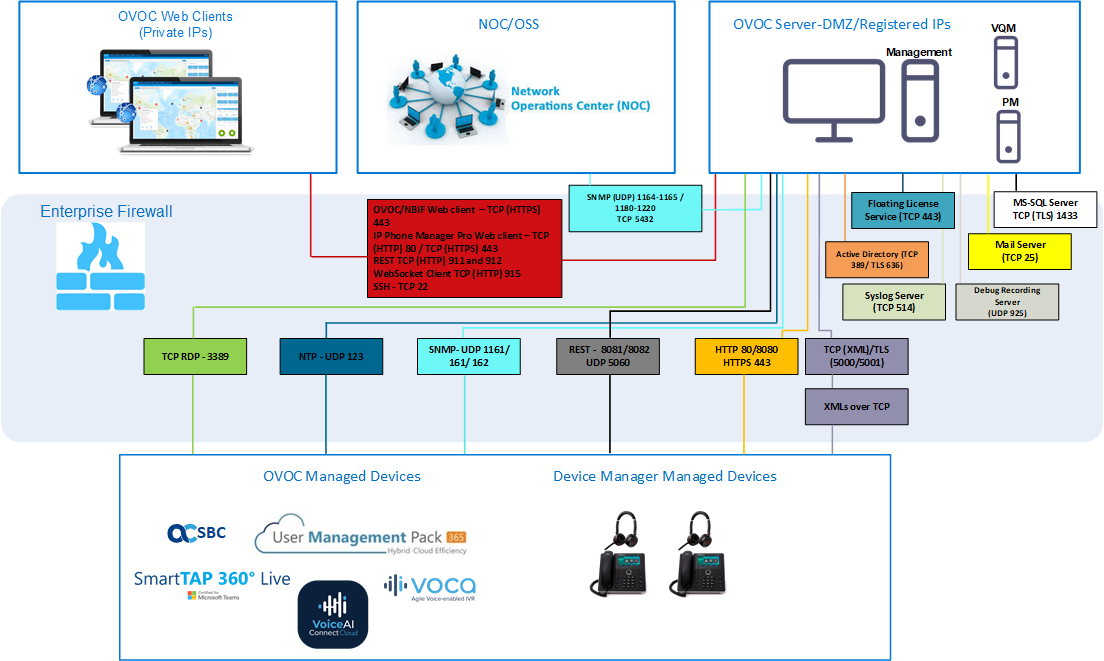
The above figure displays images of devices. For the full list of supported products, see Managed VoIP Equipment.
See also:
| ■ | Cloud Architecture Mode (WebSocket Tunnel) Firewall Settings |
| ■ | Firewall Settings for NAT Deployment |
| ■ | Firewall Settings for OVOC Server Provider (Single Node) |
Firewall Configuration Rules
|
Connection |
Port Type |
Secured Connection |
Port Number |
Purpose |
Port side / Flow Direction |
||||||
|---|---|---|---|---|---|---|---|---|---|---|---|
|
OVOC clients and OVOC server |
|||||||||||
|
TCP/IP client ↔ OVOC server |
TCP |
Ö |
22 |
SSH communication between OVOC server and TCP/IP client.
|
OVOC server side / Bi-directional. |
||||||
|
HTTPS/NBIF Clients ↔ OVOC server |
TCP (HTTPS) |
Ö |
443 |
Connection for OVOC/ NBIF clients.
|
OVOC server side / Bi-directional |
||||||
|
REST client |
TCP (HTTP) |
× |
911 |
Connection for OVOC server REST (internal) port and server debugging.
|
OVOC server side / Bi-directional |
||||||
|
TCP (HTTP) |
× |
912 |
Floating license REST service (internal) communication and Floating license service debugging.
|
OVOC server side / Bi-directional |
|||||||
|
Microsoft Teams↔ OVOC Communication |
TCP (HTTPS) |
Ö |
443 |
Connection to Microsoft Teams
|
Bi-directional |
||||||
|
Microsoft Teams↔ OVOC Communication (Internal Connection) |
TCP (HTTPS) |
Ö |
5010 |
Internal |
OVOC server side / Receive only |
||||||
|
WebSocket Client ↔ OVOC Server Communication |
TCP (HTTP) |
Ö |
915 |
WebSocket Client and OVOC Server communication (internal) according to RFC 6455, used for managing the alarm and task notification mechanism in the OVOC Web.
|
OVOC server side / Bi-directional |
||||||
|
OVOC server and OVOC Managed Devices |
|||||||||||
|
Device ↔ OVOC server (SNMP) |
UDP |
Ö |
1161 |
Keep-alive - SNMP trap listening port (used predominantly for devices located behind a NAT). Used also by Fixed License Pool and Floating License Service.
|
OVOC server side / Receive only |
||||||
|
UDP |
Ö |
162 |
SNMP trap listening port on the OVOC.
|
OVOC server side / Receive only |
|||||||
|
UDP |
Ö |
161 |
SNMP Trap Manager port on the device that is used to send traps to the OVOC server. Used also by Fixed License Pool and Floating License Service.
|
MG side / Bi-directional |
|||||||
|
Device↔ OVOC server (NTP Server) |
UDP (NTP server) |
û |
123 |
NTP server synchronization for external clock.
|
Both sides / Bi-directional |
||||||
|
Device ↔ OVOC server |
TCP (HTTP) |
û |
80 |
HTTP connection for files transfer and REST communication.
|
OVOC server side / Bi-directional |
||||||
|
TCP (HTTPS) |
Ö |
443 |
HTTPS connection for files transfer (upload and download) and REST communication.
|
OVOC server side / Bi-directional |
|||||||
|
Device↔ OVOC server Floating License Management |
TCP (HTTPS) |
Ö |
443 |
HTTPS connection for files transfer (upload and download) and REST communication for device Floating License Management. Initiator: Device |
OVOC server side / Bi-directional |
||||||
|
Devices Managed by the Device Manager |
|||||||||||
|
Endpoints ↔ OVOC Device Manager |
TCP (HTTP) |
û |
80 |
HTTP connection between the Endpoints and the OVOC Device Manager.
|
OVOC Device Manager side/ Bi-Directional |
||||||
|
HTTP connection that is used by endpoints for downloading firmware and configuration files .
|
|||||||||||
|
Endpoints ↔ OVOC Device Manager |
TCP (HTTPS) |
Ö |
443 |
HTTPS connection between the Endpoints and the OVOC Device Manager.
|
OVOC Device Manager side / Bi-Directional |
||||||
|
HTTPS connection that is used by endpoints for downloading firmware and configuration files .
|
|||||||||||
|
OVOC Device Manager ↔ ShareFile |
TCP (HTTPS) |
Ö |
443 |
HTTPS connection used by OVOC Device Manager for downloading firmware and configuration files from ShareFile.
For information on ShareFile IP Ranges, see ShareFile Firewall Configuration. |
OVOC Device Manager Side / Bi-Directional |
||||||
|
Endpoints ↔ WAF (Imperva Incapsula) and Azure Blob |
TCP (HTTPS) |
Ö |
443 |
HTTPS connection between the endpoints and the WAF.
|
Endpoints WAF side / Bi-Directional |
||||||
|
HTTPS connection used by endpoints for downloading firmware and configuration files from the Azure Blob.
|
Azure Blob side / Bi-Directional |
||||||||||
|
OVOC Device Manager Þ Azure Blob |
HTTPS connection used by OVOC to update firmware and configuration files to the Azure Blob.
|
OVOC Device Manager Side / Send-only |
|||||||||
|
OVOC Device Manager ↔ ShareFile |
HTTPS connection used by OVOC Device Manager for downloading firmware and configuration files from ShareFile.
For information on ShareFile IP Ranges, see ShareFile Firewall Configuration. |
OVOC Device Manager Side / Bi-Directional |
|||||||||
|
OVOC Voice Quality Package Server and Devices |
|||||||||||
|
Media Gateways ↔ Voice Quality Package |
TCP |
û |
5000 |
XML based communication for control, media data reports and SIP call flow messages.
|
OVOC server side / Bi-directional |
||||||
|
TCP (TLS) |
Ö |
5001 |
XML based TLS secured communication for control, media data reports and SIP call flow messages.
|
OVOC server side / Bi-directional |
|||||||
|
Skype for Business MS-SQL Server |
|||||||||||
|
OVOC Voice Quality Package server ↔ Skype for Business MS-SQL Server |
TCP |
Ö |
1433 |
Connection between the OVOC server and the MS-SQL Skype for Business Server. This port should be configured with SSL.
|
Skype for Business SQL server side / Bi‑directional |
||||||
|
LDAP Active Directory Server |
|||||||||||
|
Voice Quality Package ↔ Active Directory LDAP server (Skype for Business user authentication) |
TCP |
û |
389 |
Connection between the Voice Quality Package server and the Active Directory LDAP server.
|
Active Directory server side/ Bi‑directional |
||||||
|
TCP (TLS) |
Ö |
636 |
Connection between the Voice Quality Package server and the Active Directory LDAP server with SSL configured.
|
Active Directory server side/ Bi‑directional |
|||||||
|
OVOC server ↔ Active Directory LDAP server (OVOC user authentication) |
TCP |
û |
389 |
Connection between the OVOC server and the Active Directory LDAP server (OVOC Users).
|
Active Directory server side/ Bi‑directional |
||||||
|
TCP (TLS) |
Ö |
636 |
Connection between the OVOC server and the Active Directory LDAP server (OVOC Users) with SSL configured.
|
Active Directory server side/ Bi‑directional
|
|||||||
|
RADIUS Server |
|||||||||||
|
OVOC server ↔ RADIUS server |
TCP |
û |
1812 |
Direct connection between the OVOC server and the RADIUS server (when OVOC user is authenticated using RADIUS server).
|
OVOC server side / Bi-directional |
||||||
|
AudioCodes Floating License Service |
|||||||||||
|
OVOC server ↔AudioCodes Floating License Service |
TCP |
Ö |
443 |
HTTPS for OVOC/ Cloud Service
|
OVOC REST client side / Bi-directional |
||||||
|
External Server Connections |
|||||||||||
|
OVOC server ↔ Mail Server |
TCP |
û |
25 |
Trap Forwarding to Mail server
|
Mail server side / Bi-directional |
||||||
|
OVOC server ↔ Syslog Server |
TCP |
û |
514 |
Trap Forwarding to Syslog server.
|
Syslog server side /Bi-directional |
||||||
|
OVOC server ↔ Debug Recording Server |
UDP |
û |
925 |
Trap Forwarding to Debug Recording server.
|
Debug Recording server /Bi-directional |
||||||
|
OVOC server ↔Remote Managed Device |
TCP RDP |
Ö |
3389 |
Remote Desktop access Apache to Managed Device through the Guacamole VPN gateway.
|
Managed Device/Bi-directional |
||||||
|
Voice Quality |
|||||||||||
|
Voice Quality Package ↔ Endpoints (RFC 6035 ) |
UDP |
û |
5060 |
SIP Publish reports sent to the SEM server from the endpoints, including RFC 6035 SIP PUBLISH for reporting device voice quality metrics.
|
SEM server / Bi‑directional |
||||||
Northbound Interfaces Flows: NOC/OSS → OVOC
|
Source IP Address Range |
Destination IP Address Range |
Protocol |
Secure |
Source Port Range |
Destination Port Range |
|
NOC/OSS |
OVOC |
SFTP |
Ö |
1024 - 65535 |
20 |
|
FTP |
û |
1024 - 65535 |
21 |
||
|
SSH |
Ö |
1024 - 65535 |
22 |
||
|
Telnet |
û |
1024 - 65535 |
23 |
||
|
NTP |
û |
123 |
123 |
||
|
HTTP/HTTPS |
û/Ö |
N/A |
80/443 |
||
|
SNMP (UDP) Set for the Active alarms Resync feature. |
û |
N/A |
161 |
||
|
TCP-IP TLS encrypted connection for Data analytics DB Access Initiator: DB Access client This port is open when the "Data analytics" Voice Quality feature license has been purchased and the feature has been enabled (see analytics API). |
û |
N/A |
5432 |
OAM Flows: OVOC → NOC/OSS
|
Source IP Address Range |
Destination IP Address Range |
Protocol |
Secure |
Source Port Range |
Destination Port Range |
|
OVOC |
NOC/OSS |
NTP |
û |
123 |
123 |
|
SNMP (UDP) Trap |
û |
1024 – 65535 |
162 |
||
|
SNMP (UDP) port for the Active alarms Resync feature. |
û |
1164 - 1174 |
- |
||
|
SNMP (UDP) port for alarm forwarding. |
û |
1180-1220 |
- |